TextCortex AI Review 2026: Features, Pricing, Pros & Cons
Introduction
TextCortex AI is an AI writing and research helper that helps students, researchers, writers, marketers, and professionals generate and enhance material more quickly. TextCortex AI offers AI writing, paraphrasing, rewriting, summarizing, research, and content optimization tools that may make ordinary writing chores easier as well as more complicated research processes. TextCortex AI’s price is based on the number of plans and consumption; therefore, the best plan for you will depend on how often you utilize TextCortex AI’s AI capabilities. But is TextCortex AI good? It might be a helpful tool for saving time and boosting productivity if you write, study, or summarize material often, or want to enhance current work. In this TextCortex AI review, we’ll explore its features, price, writing and research skills, pros and disadvantages, and overall value to discover whether TextCortex AI is the appropriate AI tool for you.
What Is TextCortex AI?

TextCortex AI is an AI-driven writing and productivity tool that enables users to create, modify, summarize, and improve text without the need for human intervention. The TextCortex AI writing assistant may aid you with a number of writing tasks, such as creating original content, editing existing text, streamlining information, and improving your ability to arrange your ideas.
TextCortex AI is built for those who typically deal with textual material so they may create content quicker and more easily. For students, this means improving assignments and research-based writing. Writers, marketers, and professionals are able to utilize the platform to generate material, revise sentences, summarize information, and increase overall clarity.
More than simple text generator, AI writing assistant can help throughout the writing process, not only generate text. Cortex AI assists users to go from a basic concept to a higher-quality piece of material, aiding with writing, rewriting, summarizing, and editing.
TextCortex AI is all about saving you time, boosting your productivity and simplifying the content production process. In this TextCortex AI review, we will also go over its essential features, writing skills, cost, and how beneficial it is for various sorts of users.
How Does TextCortex AI Work?
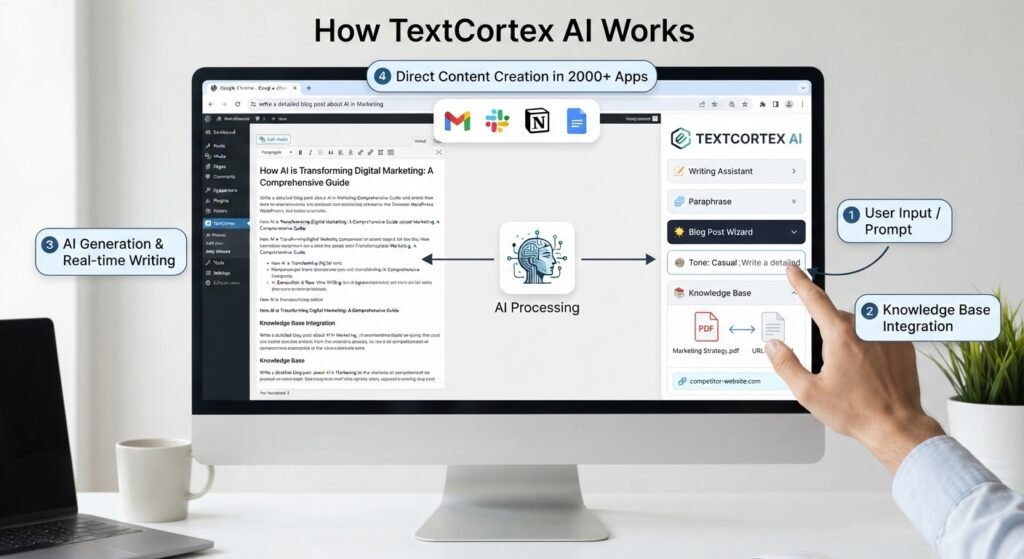
First, you will have to register an account and open your workspace to use TextCortex AI. Select the style of content or writing activity you wish to perform and provide a clear prompt or paste your current material. TextCortex interprets your instructions and generates AI content that you may alter and improve to your liking. Review everything thoroughly, confirm key facts, and make sure it is appropriate for your purpose before utilizing the final version.
1.How to Use TextCortex AI for Content Creation
For example, if you wish to write a blog article, choose the suitable writing activity and specify your topic in the prompt. Include helpful information such as your target audience, tone of voice and what you want the article to include. TextCortex will create a draft, which you may edit, rewrite or expand in the workspace. Then, when you’re ready to publish the content on your website or for a client project, add your own thoughts and do the final revisions.
2.TextCortex AI Content Writing Assistant for All Your Content
Cortex is ready to assist you with any form of writing, whether you’re looking to create something out of nothing or refine something that already exists. This can be handy for blog posts, articles, emails, social media postings, product descriptions, and academic/general writing.
It can also be used to reword existing material, condense extensive content, or summarize information into something brief and to the point. This is good if you want to save time but still have a say in what the end product will be.
Rewrite with TextCortex AI
If you want to rewrite your content, you can use the TextCortex AI tool, which can help make your content clearer, more suitable, and convert it into a specific tone. If you want to change something in your content, first you provide your original content. This tool can change your content to be more professional, simple, friendly, and easy to understand for users.
When your content is rewrite version anothe opetion you can further change your content according to your style and requirements. sometime you went, to improve your content according to your satisfaction and user satisfaction, you can write again.
TextCortex AI for Blogging
if you are a blogger and you want to target a more authentic audience. First, you provide a proper topic and mian point you want to convey. This tool can help you and improve your work.
The draft generated, nevertheless, is not to be considered final. You may make the post more informative and true to life by adding your own experience, examples, and comments before publishing.
Email with TextCortex AI
The TextCortex AI tool is very helpful for office workers. Sometimes many office workers want to write a professional email for a client; it is a difficult task. This tool can help you make it easier and write a professional email in a short time.
Then it can write a draft to work from, which you can edit before you send it. It’s good to review the message personally to ensure the phrasing, facts, and tone are acceptable for the recipient.
TextCortex AI PDF Translator?
TextCortex AI helps users convert key information from PDF documents into another language without copying and pasting every paragraph. This tool helps you translate business reports, student assignments, research papers, and long-form PDF files. First, upload a file, select the required language or target audience, and get it converted into a document. Textortext supports multiple languages. Users of this AI tool work on international documents for writing and reading.
A key benefit of PDF translation is that you can upload a full document rather than a single page. This feature can save you time. When you convert a document to PDF manually, the process is very complex and time-consuming. Sometimes technical phrases, difficult paragraph names, and company-specific terms aren’t translated correctly.
Another significant element to consider is the layout of the translated PDF. PDFs in text format are often simpler to handle, but documents with tables, graphics, charts, many columns or complicated layouts may need further inspection after translation. The translation may not match the original layout. Users should examine the output and make any required corrections before using or publishing the translation
How to Translate a PDF With TextCortex AI
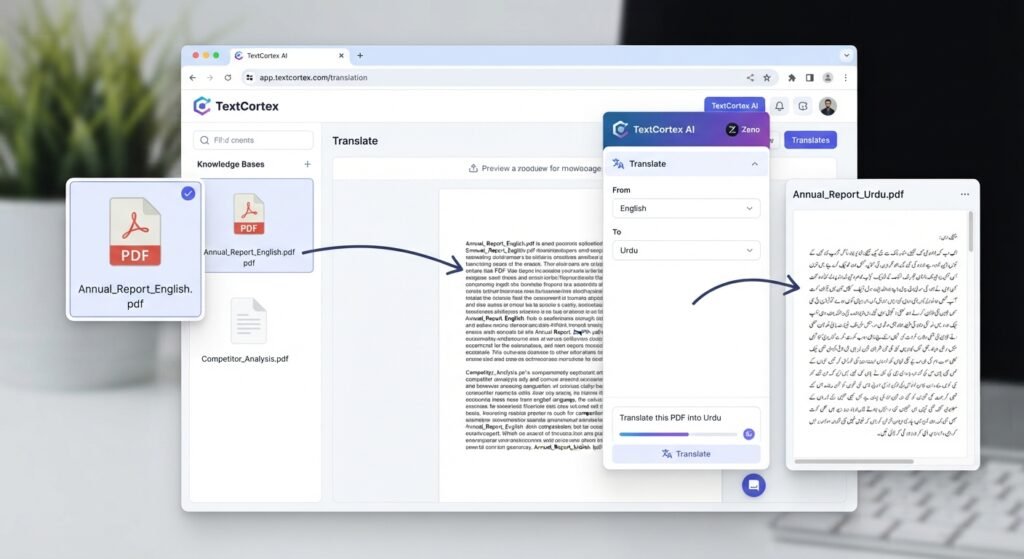
Translating a PDF using TextCortex AI is as simple as it gets. First, go to TextCortex and use its PDF or document translation tool. Upload the PDF you wish to translate and pick the source language of the document. Next, choose the language you want your material to be translated into. Begin translating, and TextCortex AI will perform the job on your paper. Once you are done with the translation, carefully go over the result and make any required modifications. Be careful with technical phrases, names, figures, tables, and crucial comments to ensure that the translated text truly portrays the original.
AI translation is a quick approach to save time for small and medium-length publications. But for really lengthy or very technical PDF files, human inspection is still required. TextCortex may speed up the translation process, but it should not be used as a substitute for professional translation where accuracy is essential, such as in legal, medical, academic, or governmental papers.
TextCortex AI Features?
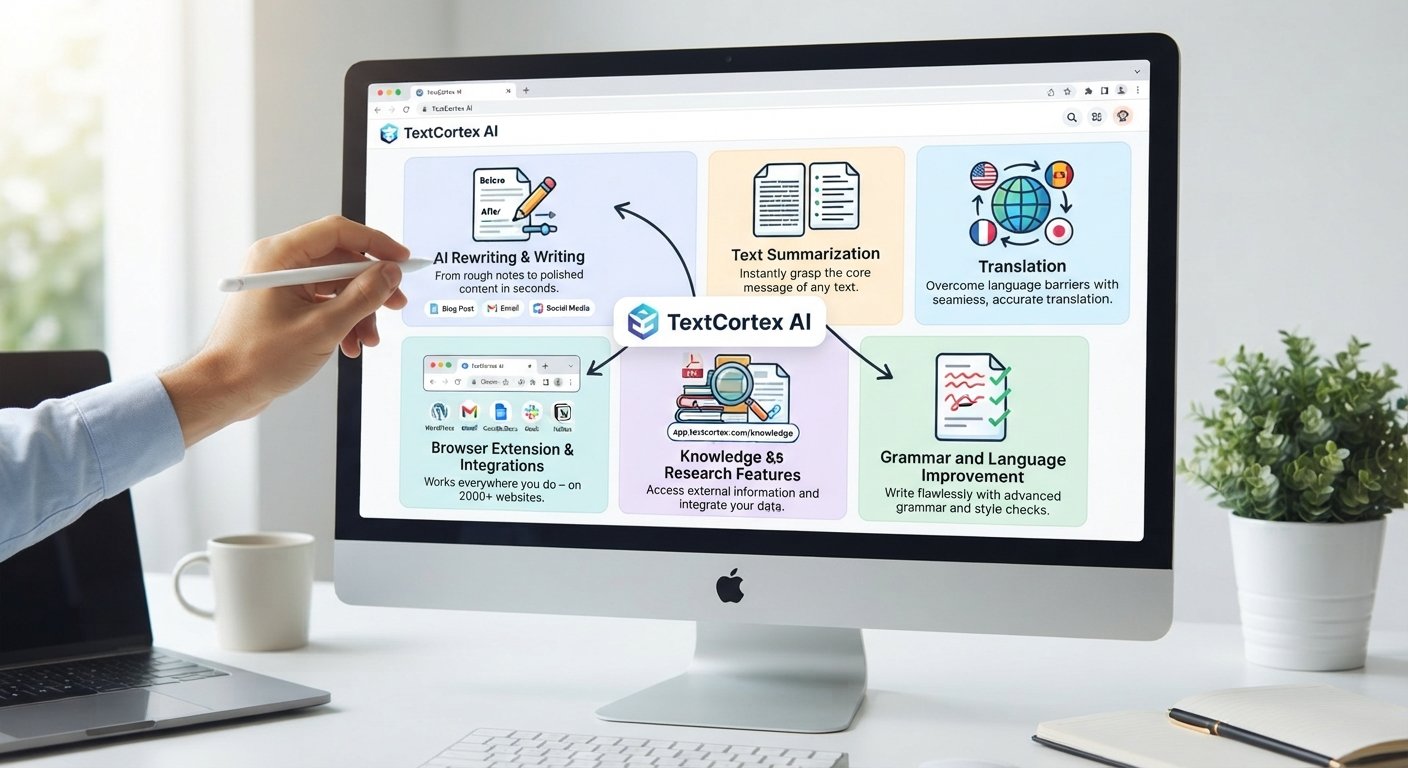
TextCortex AI has a lot of capabilities that can help you write, rewrite, summarize, translate, research, and deal with information more effectively. Users will be able to obtain AI support when working on papers, webpages, emails, and more, instead of needing to engage with different tools for every writing assignment. The current collection of features includes: writing and rewriting tools, summarization, translation, grammar improvement, online research, knowledge bases, browser-based support, and interfaces with popular applications and services.
1. AI Rewriting & Writing.
It helps users produce fresh material using ideas, instructions, or important points. Useful for blog posts, articles, emails, reports, academic writing, social media material, and other forms of prose. If you have existing text, the rewriting function may assist you in rewording it while maintaining the original intent. Using this tool, you want to turn your content idea into something small that you can easily convert. When you adjust your content tone, it looks more professional, friendly, and easy to understand.
this feacture make useful when you know what you want to say but need to convert your thoughts into clear writing. When you generate your content through AI, before publishing, you read your content carefully.
2.Text Summarization
TextCortex helps users summarize long text, so they can get the gist and key points without reading every word. It can summarize web pages and YouTube videos using its browser plugin, but its AI technologies can handle lengthy papers and information. This is great for students working on research material, professionals scanning long papers, or anybody who wants a rapid summary of the important points.
For example, instead of reading a whole lengthy article to see whether it is relevant, you may utilize a summary to get the essential concepts first and then go to the original source when you need additional information.
3.Translation
TextCortex also has translation features for those who deal with text in other languages. Translation into over 25 languages is available via its browser toolbar, enabling users to translate selected text without leaving the site they are working on. This may be handy for international communication, research, emails, papers, and multilingual material.
Translation is especially valuable when you need to get up to speed on current information or alter it fast. However, it is always necessary that critical professional and highly technical translations be checked to ensure that terminology and context are proper.
4.Grammar and Language Improvement .
Improve spelling and grammar, and enhance the quality and clarity of current work using TextCortex. Its browser-based toolbar can operate immediately on selected text, so you may rectify errors without having to transfer your information into another editing application. It may also make text more compact or larger to make an explanation simpler to grasp, or to add information.
This function might be handy for students, authors, marketers, and professionals who wish to polish an email, article, report, or other written content before publishing it.
5.Knowledge and Research Features .
One of the most sophisticated features of TextCortex is the Knowledge Base and AI research. Users may upload files and other information to a knowledge base, and then can ask the AI questions based on that content. Supported sources include PDFs, Word documents, PowerPoint files, spreadsheets, web URLs, Google Docs, Google Sheets, and other related sources. Instead of having humans manually go through each document, the AI searches for the appropriate areas using the available information.
TextCortex also has a Web Search capability, which enables its AI agent to search the internet for current data. Depending on the search choices used, users may work with sources including general online results, news, Google Scholar, Reddit, and X. Results contain references, so users may examine the facts for themselves. TextCortex itself encourages users to fact-check the AI-generated findings since artificial intelligence systems might still provide wrong information.
If you have a research-heavy kind of job, this combination might be handy. You can work with your own papers and with external online material. Knowledge base: You may also compare information across numerous documents using a knowledge base, although particularly big or complex jobs may perform better when split into smaller searches.
6.Browser Extension and Integrations.
TextCortex Browser Extension is meant to integrate AI technologies directly into the websites and platforms you currently operate on. The plugin may help you rewrite, fix grammar, translate, summarize, draft emails, do research, and other writing chores without having to copy and paste between multiple apps all the time. TextCortex said their browser plugin is compatible with over 30,000 platforms and sites.
Cortex also integrates with many services, including Gmail, Microsoft Outlook, WordPress, Notion, Slack, LinkedIn, Facebook, Youtube, Google Drive, Microsoft OneDrive, Zendesk, Freshdesk, Zapier, Make, etc. These connections may make TextCortex more useful for teams and professionals that need AI help inside their current processes, rather than a separate tool.
TextCortex is not only a simple AI writing tool, brief. Its mix of writing, rewriting, summarization, translation, grammar correction, online research, knowledge bases, browser aid, and integrations lends itself to a range of content and productivity applications. What is most beneficial depends on what you want to use it for, writers will find rewriting and content creation more useful while researchers and teams will find knowledge bases, online search and integrations more valuable.
TextCortex AI Pricing?
TextCortex AI has pricing plans for people and organizations who require more sophisticated use and for those who wish to check out its AI products for free. We now have a Free plan, Premium plan, and Enterprise plan. The Free plan costs $0 per month and gives restricted access to essential functionality, whereas the Premium plan costs $29.99 per user per month. Cortex has a bespoke Enterprise price specifically for companies and bigger organizations. The official pricing site also has an annual option billed with 2 months free. Prices may fluctuate, so it’s worth checking the official TextCortex price page before signing up.
If you want to try TextCortex without paying, the Free plan is a fantastic place to start. It offers access to core features, knowledge bases, custom agents, agent skills and connections, and deep research, with use and file storage limits. The Premium plan is for those who use AI more often and need all main models, increased consumption, bigger file storage, and picture production. Enterprise is for enterprises that require more administrative, security, deployment, and support options.
TextCortex AI Pros and Cons?
It’s helpful to look at the pros and cons of an AI writing helper before you choose. The TextCortex AI advantages and drawbacks reveal that the platform may be beneficial for content generation, rewriting, summarization, translation and research, but it is not a perfect substitute for human editing. Jasper’s biggest advantage is that it combines several AI writing and productivity features into one place, but the biggest drawbacks are that the free plan has limited usage and you’ll need to review the AI-generated copy for accuracy and quality.
- Easy content generation for different writing tasks
- Supports multiple writing and rewriting tasks
- Useful rewriting and text improvement features
- Translation and summarization capabilities
- Knowledge bases and research features can help with information-heavy work
- Free usage is limited
- AI-generated output may still need editing
- Results can vary depending on the prompt and content
- Some advanced capabilities are available on paid plans
- Important information should still be fact-checked
TextCortex AI App ?
If you’re looking for a TextCortex AI mobile app, you may access TextCortex on Android and iOS using a mobile browser. You don’t need a separate native mobile app; you can launch the TextCortex online app in Safari on iPhone or Chrome on Android and add it to your home screen for easier access.
Does TextCortex AI work on Mobile?
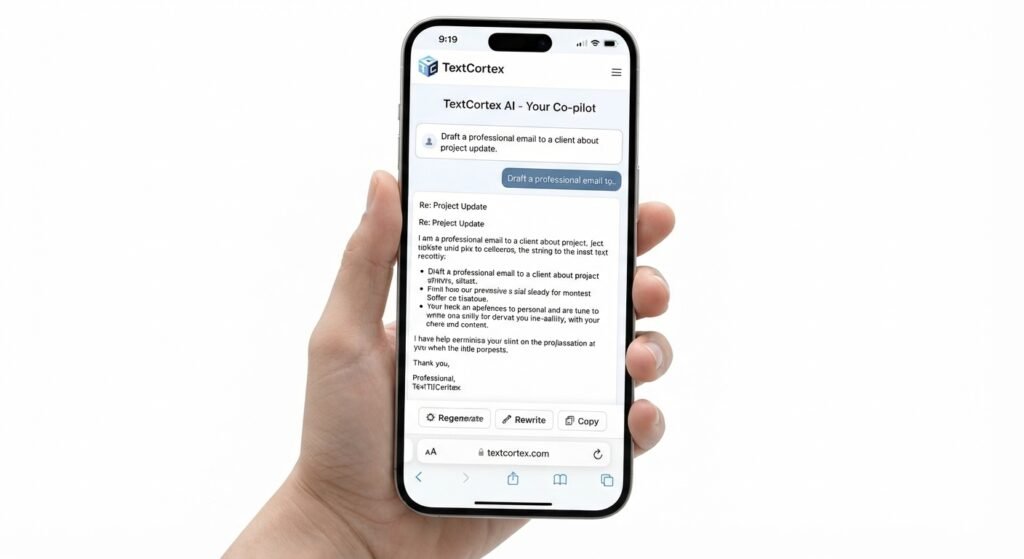
Yes, TextCortex AI is accessible on mobile with its online version. On iPhone, you may access TextCortex via Safari and choose Add to Home Screen. Android users may then access the platform in Chrome and add it to the Home Screen or create a shortcut. This way, you may quickly reach TextCortex without having to look for the website every time.
The TextCortex browser add-on is a distinct alternative particularly meant for desktop browsers. It works with Chromium-based browsers such as Chrome, Edge, Opera, Vivaldi, and Brave, enabling users to use TextCortex when writing, researching, summarizing, translating, or modifying text online.
So for mobile users, the online version is the realistic method to access TextCortex. However, the experience of using the mobile browser may not be precisely the same as using the desktop browser extension.
TextCortex AI Review: My Verdict.
After using TextCortex on a variety of writing, rewriting, translation, summarization, and research activities, my overall view is that it is a helpful AI writing helper for content producers, marketers, writers, and teams looking to speed up their daily content production. It does more than just text production, including features for rewriting, summarizing, translating, researching, and dealing with your own papers.
1.Writing Quality
When you offer it a precise question and adequate information, TextCortex can generate clear and useable drafts. Usually the quality is greater if you tell it what you want, who you want it for, what tone you want it in, and any prerequisites you need, rather to just a quick generic prompt.
2.Ease of Use
The platform is rather basic for most writing jobs. You choose the type of task you want to do, enter your instructions or existing text, and tweak the output. TextCortex’s browser-based workflow and extension also make it easier to operate across multiple websites and online documents.
3.Features
Cortex’s biggest strength is the number of functionality it packs into one platform. Besides AI writing and rewriting, it provides summarization, translation, grammar and language enhancements, research, knowledge bases, AI agents, and integrations. This makes it more usable for people who require an AI writing and productivity tool, not just a simple text generator.
4.Translation
Cortex is useful for rapid translations or working with multilingual material. It enables translation for more than 25 languages, which makes it helpful for websites, emails, papers, and other popular information. However, translations using technical, legal, medical, or highly specialized language should be checked by a person who knows the topic.
5.Value for Money
Cortex might be an excellent value for customers who frequently generate, edit, summarize, translate, or study information, since there are numerous jobs accessible in the same platform. However, if you just want to use AI writing occasionally and want entirely free access with no restrictions, it’s probably not the greatest option.
6.Final Verdict
TextCortex AI review conclusion: TextCortex is a good choice if you want an all-in-one AI assistant for content creation, rewriting, translation, summary, and research. The best thing about it is that it combines numerous productivity aspects, not only a writing feature.
Best suited for:
Content developers who create content frequently
Marketers experienced in many forms of copy
Authors needing help with writing and rewriting
Teams seeking a wider AI productivity platform
Not good for:
Users who want totally free AI use with no restrictions
People expecting immaculate AI-produced material without modifying
Users who want a very simple AI authoring tool.
To summarize, I would suggest TextCortex if you’re looking for one platform that can do many content and productivity jobs. Just remember that the greatest results are still achieved by providing the AI with precise instructions and checking the final output personally
TextCortex AI vs Other AI Writing Tools
| Feature | TextCortex AI | ChatGPT | Grammarly | QuillBot |
|---|---|---|---|---|
| AI writing | ✓ | ✓ | ✓ | ✓ |
| Rewriting | ✓ | ✓ | ✓ | ✓ |
| Translation | ✓ | ✓ | ✓ | ✓ |
| Grammar | ✓ | ✓ | ✓ | ✓ |
| Best for | Content workflow | General AI | Editing | Paraphrasing |
TextCortex AI Alternatives .
| Alternative Tool | Core Focus / Best For | Comparison with TextCortex |
|---|---|---|
| ChatGPT | General AI Assistant | Best for broad chats, brainstorming, research, and coding, whereas TextCortex focuses more on workflows, custom integrations, and working directly with your data. |
| Grammarly | Editing & Grammar | Better match if your major concern is grammar, clarity, tone, and editing current text, while TextCortex offers stronger AI authoring, translation, and research functions. |
| QuillBot | Paraphrasing | Ideal if you mainly need to rephrase or summarize existing text, whereas TextCortex suits users wanting a comprehensive writing and productivity workflow. |
Frequently Asked Questions