
Continue.dev AI Honest Review : Features, Pricing, Setup & Alternatives
Introduction
Continue.dev is an open source AI coding assistant that uses AI to help developers write, complete, explain, revise and improve code. It has AI code autocomplete, chat, code editing and agent-based coding workflows. Continue is for beginners, skilled engineers, and teams who want greater control over their AI development setup. It integrates with VS Code and JetBrains IDEs, although the state of the project is worth noting: the original continuedev/continue GitHub source is recognized as no longer actively maintained, and the JetBrains plugin is now community maintained. The project promotes the Continue CLI for its actively developed coding-agent experience.
This Continue.dev AI review explores its key features, open-source license, configuration options, practical uses, and limits to help you identify whether it’s the ideal AI coding tool for your workflow. It may be useful for developers that want a flexible helper, and more flexibility on their AI models. For those that want a fully maintained, plug-and-play IDE extension, check the latest official documentation before installing it.
What Is Continue.dev AI?
Continue.dev AI is an open-source AI code tool that helps developers write, understand and improve their code from within their development workflow. code autocomplete, AI chat, code editing and agent-like responsibilities . People who want more control over how AI helps them with programming can use it as a flexible choice, as it allows developers to connect approved AI models from multiple suppliers.
I use AI coding tools to help with the development process, particularly when working with legacy code, fixing issues, or developing standard features for websites. What I like about Continue.dev is that it is customized, so developers are able to choose the right AI models compared to depending on a single built-in assistant. However, its value depends on model, setting, and complexity of coding work. For an honest review, I look at if its ideas are useful, whether the code created needs major changes and how well it fits into an existing process.
1.How Continue.dev Works.
Continue.dev links AI models to your coding workflow to help you write, understand, and improve code. You can utilize it for daily programming work without manually dealing with every step.
1.Code completion:
It suggests code as you enter code that helps you develop functions quick and removes repeated effort.
2.AI chat and code explanation:
Helps you with understanding novel code, solving faults, and investigating possible solutions.
3.Code editing and refactoring:
Allows you to ask for code changes, make functions simple, and increase readability. For example, you can ask for help with fixing a PHP or JavaScript issue on a WordPress website.
4.AI agent workflows
Continue may check project files, alter multiple files, and conduct coding jobs with no human involvement, given compatible models and tools.
The results will vary depending on which AI model you choose, and what context you give it. I strongly suggest analyzing the generated code and testing the changes before applying them in a live project, especially if you are working with databases, security or payment features.
2.Is Continue.dev Free and Open Source?
Continue is an open-source AI coding assistant, distributed under the Apache 2.0 license, which allows developers to review, alter, and distribute its code in accordance with the license rules. But open source doesn’t mean all AI models are free to use.
Hosted models may have an API fee, however, local models (such as Ollama) can help avoid those expenses but require hardware. Your results will depend on the model you select.One limitation to consider is maintenance: the original Continue GitHub repository is no longer actively maintained and the JetBrains plugin is community-managed. Check the most recent official documentation before installing.
My take: check out Continue if you care about customisation and model versatility. If you want a coding helper that is fully maintained and ready to go, evaluate the existing support and setup requirements against alternative tools before contributing.
Continue.dev AI Coding Tool Features:
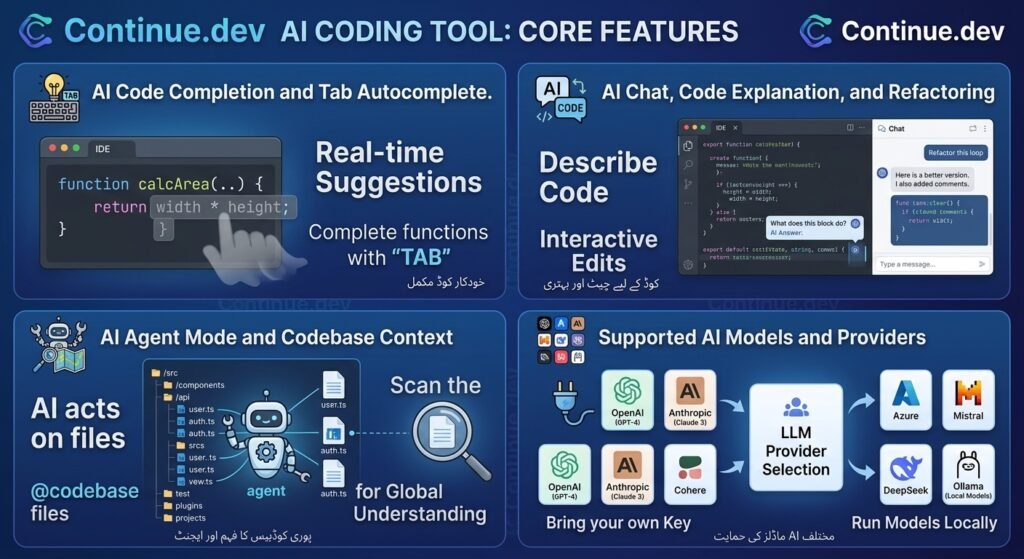
Continue.dev is designed with a number of features to help daily programming simple, from writing code quickly to dealing with more complicated development responsibilities. Its key features are complete AI chat, code editing, Agent mode, and support for numerous AI model providers. The features available to you depend on your configuration and on the model you purchase.
1. AI Code Completion and Tab Autocomplete:
Continue on.dev autocomplete recommends code as you type, helping you complete functions, make regular statements, and stay in your coding flow. Its Tab function allows you to accept given a code with a keyboard shortcut, instead of typing every line yourself. You may also set up a specific autocomplete model for faster text suggestions.
If you’re a developer working on WordPress, PHP, JavaScript or other programming projects, it can save you from a lot of repeated typing. But ideas can need fixes, particularly if the code depends on complex project logic or specialized routines.
2. AI Chat, Code Explanation and Refactoring:
The Chat function and Edit tools in Continue can help engineers learn existing code, fix problems, and improve code structure. You can search for a function, find an explanation of confusing logic, or select code and request specific changes without having to manually change everything.
I find such types of help especially helpful when examining a code workflows, because understanding the suggested answer is as important as writing it. For example, you may ask Continue to explain a PHP method or suggest a cleaner implementation for a JavaScript feature. Always check the modifications and test the output before utilizing it in a live project.
3. AI Agent Mode and Codebase Context:
Continue’s Agent mode doesn’t just answer queries, it uses available resources to work on development tasks. Depending on the model and the rights set, it can expose files, modify them throughout a code base and conduct logical commands. You can see your project in read-only mode in Plan mode and execute actions that change your project in Agent mode.
This can be useful for things like fixing an issue that covers many files or creating a modest feature from a written command. But agent type capabilities are different by model, so you should analyze the suggested steps before allowing changes to happen.
4.Supported AI Models and Providers:
Continue supports various AI model providers which allow developers to choose models for specific coding jobs. Supported alternatives are documented below in the official documentation:
1. OpenAI.
Connect to supported GPT models to get coding help.
2.Anthropi.
For code generation, explanations, and agent-based coding tasks, use suitable Claude models.
3.Google Gemini.
Set up Gemini models supported for coding tasks.
4.Ollama
Run suitable local models on your own computer, according to hardware and model restrictions.
“You can provide multiple models for chat and autocomplete not just one for all. Hosted models may require API keys and paid usage, while local models can benefit from lower API charges but require suitable hardware. Not every model supports all of these features. Be sure to verify the official documentation for the model before selecting a provider.
Continue.dev AI Coding Tool Features:
The Continue.dev VS Code plugin helps programmers edit and analyze code while they work. First, install the plugin, connect your AI model, and check the feacture you want to use. Advanced features depend on your budget and computer resources.
1.How to Install Continue.dev in VS Code:
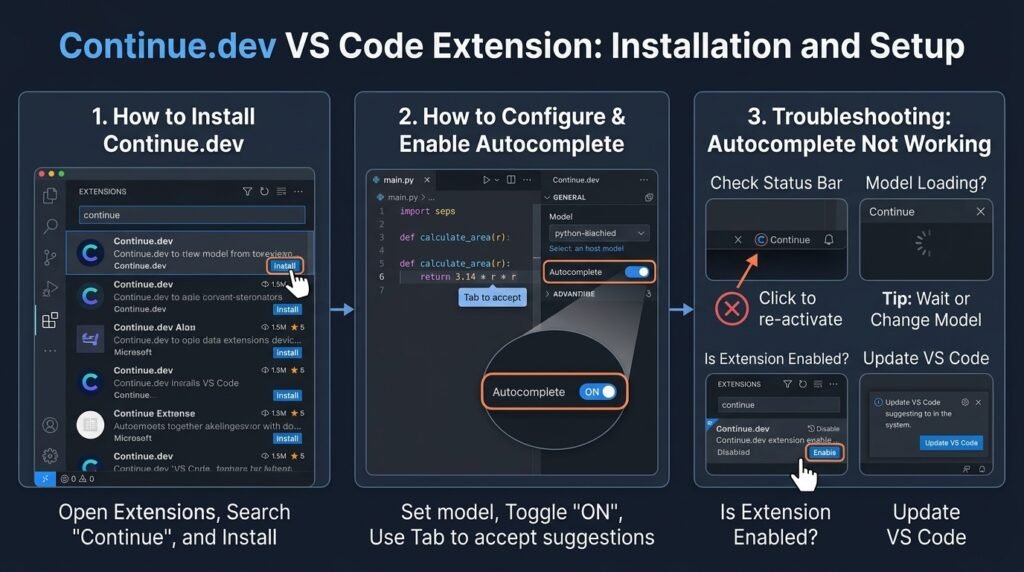
- To install Continue.dev for VS Code, follow these steps:
- Start Visual Studio Code on your computer.
- Press Ctrl+Shift+X to open the Extensions pane.
- Look for Continue and choose the extension from the official installation guide.
- Click Install and let the installation finish.
- To access its AI coding interface, open Continue from the sidebar.
- Select or configure an AI model using the configuration prompts.
Tip: Always confirm the publisher and official documentation before installing an extension. Different considerations apply to the upkeep of Continue’s original IDE extension and the updated CLI-based process.
2. How to Configure Continue.dev in VS Code:
- Once you install the extension, you may select a supported AI model for your coding needs. Depending on the source you may need an API key or install a local model.
- Select a model: Choose a conversation, code editing, or autocomplete model that suits your needs.
- Add your API key: If you are using a web-based provider, please follow the official steps to get and set your key.
- Set up model roles: Continue allows you to assign multiple models to responsibilities such as conversation and Tab auto finish.
- Change settings: Customize autocomplete features and other parameters to suit your coding style.
Continue using config.yaml for its existing configuration format. See the official model setup guide for supported providers and settings samples. Protect your API keys and don’t commit them to public repositories.
3.How to Enable Autocomplete in Continue.dev:
For autocomplete to work in Continue.dev in VS Code, you must have a compatible autocomplete model setup.
- Open Continue in VS Code.
- Set up a model that supports the autocomplete role.
- Enable Select Tab Autocomplete in the extension’s options, or click the Continue status-bar control.
- Open a code file and start typing to get inline suggestions.
- Press Tab to accept a suggestion, Esc to dismiss it
- You can also manually enable an offer with Ctrl + Alt + Space on Windows/Linux (depending on your keyboard setup). For better results, choose a model designed for code completion, rather than assuming a general-purpose discussion model will do just as well.
4.How to Fix Continue.dev Autocomplete Not Working:
- If Continue.dev is not working. check these simple problems before deleting the plugin.
- Missing model configuration: verify that a valid model is connected to the autocomplete role.
- API or provider errors: check your Api key, account access, and provider limits
- VS Code inline suggestions disabled: open Account and Search VS Code settings for editor.inlineSuggest.enabled and make sure it is enabled.
- Autocomplete turned off: check that the autocomplete option is turned off.
- Extension or configuration problems: Reload VS Code, check the extension’s output and logs, and consult the official troubleshooting guide.
Continue.dev with IntelliJ and JetBrains IDEs:
Continue.dev is a JetBrains plugin that enables you to code with the help of AI in the IDEs it supports. These include IntelliJ IDEA, PyCharm, and PhpStorm. The plugin supports chat, code editing, autocomplete, and agent capabilities. But the JetBrains plugin is now managed by the community and Continue recommends its CLI for the actively developed coding-agent experience. Before installation, check current compatibility. Official JetBrains plugin source
1. How to Install Continue.dev in IntelliJ IDEA
- Continue Install.dev IntelliJ plugin; do the following:
- Open IntelliJ IDEA and navigate to Settings with Ctrl + Alt + S.
- Choose Plugins, then the Marketplace tab.
- Search for Continue and ensure you have the relevant plugin chosen.
- Click Install and restart the IDE if asked.
- Open Continue and set up a supported AI model before using its coding features.
- You may also get the plugin from the JetBrains Marketplace. Please see the latest release notes and compatibility requirements before installing.
2.Continue.dev VS Code vs JetBrains: Which Should You Choose?
Choose the environment that best fits your existing workflow
Continue.dev Pricing: Is It Free?
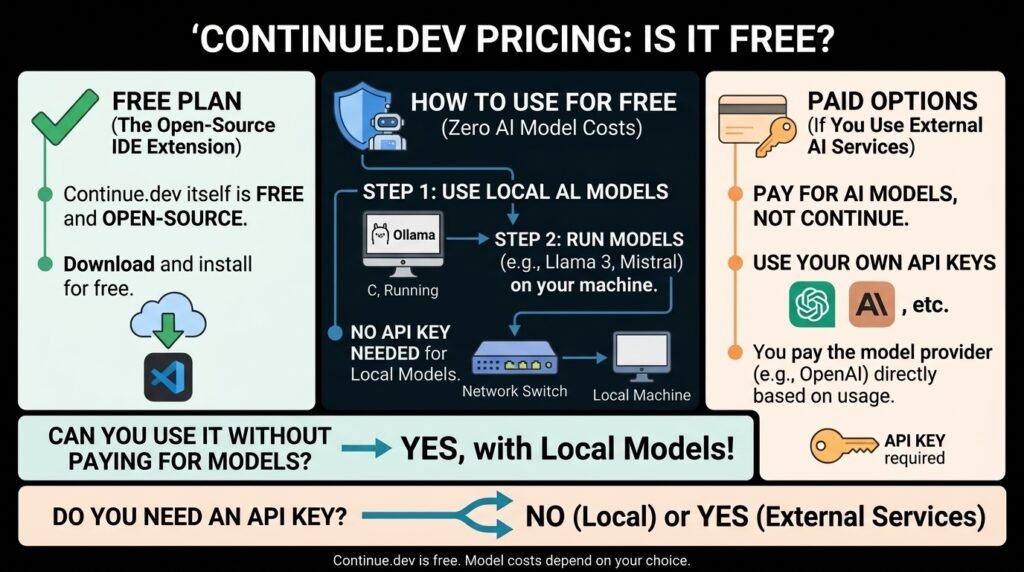
Continue.dev is open source coding software under the Apache 2.0 license. This means you can read the source code of Continue.dev without the need to purchase a software license. But Continue being free doesn’t mean every AI model is free to use. The exact cost depends on whether you’re using a hosted AI service, a free model endpoint, or a local model on your machine.
1. Continue.dev Free Plan and Paid Options:
when the code remains open-source and free, there may be additional fees by hosted AI services to use the model. Search for the current official information, not previous price articles or plan names. The official site for Continue now says the project has been bought by Cursor.
The least expensive solution is a local model that works or a free service from a supplier. Please review current limitations, models and terms before selecting a setup.
As of April 10, 2026, Continue’s pricing page lists three main options:
- Starter: $3 per million tokens, pay as you go
- Team: $20 per seat per month, including $10 in credits per seat
- Company: custom pricing
2. Do You Need an API Key to Use Continue.dev:
Not always. Most hosted providers require an API key, but some setups can run on local models without a paid cloud API key. Depending on your system, you may also have to log into a service or set up a model in Continue’s settings.
Continue supports providers such as OpenAI, Anthropic, Google Gemini, and Ollama. The actual processes for authentication will depend on the supplier and model you choose. For setup information, see the official documentation of the model provider.
3.Can You Use Continue.dev Without Paying for AI Models?
Yes, you can continue using a suitable local model through a solution like Ollama, avoiding the per-request costs of a hosted AI API. Some hosting providers also offer free quotas, although they can have usage limits or they can alter over time.
Local models still need enough RAM, storage and computing power. Smaller versions are helpful for basic coding help, but more difficult jobs could need beefier hardware or a more capable model. If your biggest concern is cost then start with a small local model that is compatible and try the code ideas before trusting it with some serious development.
How to Use Continue.dev with Local AI Models
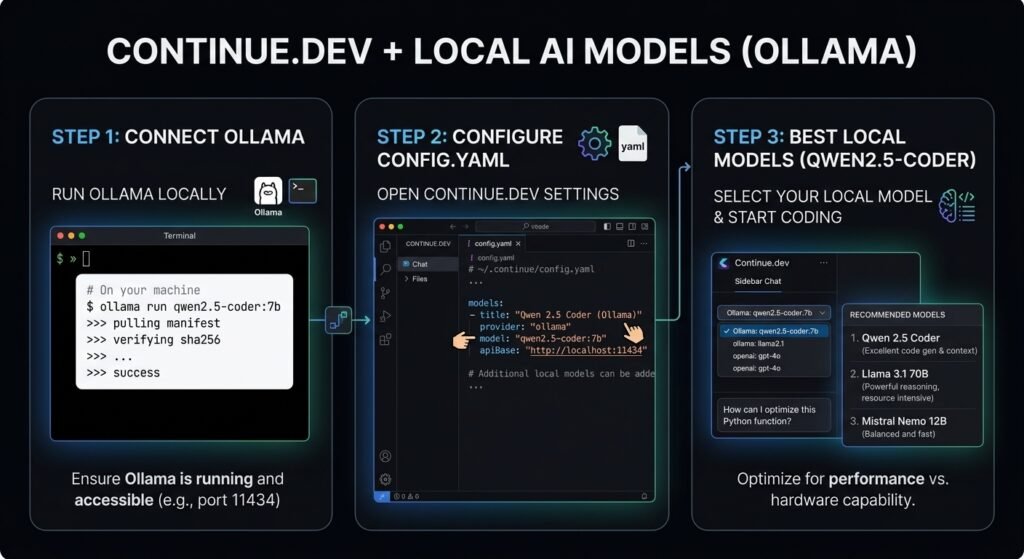
This tool allows developers to connect local AI models like Ollama instead of depending just on AI APIs in the cloud. This could save you API charges and keep the code processing on your own system. To begin, install Ollama, get the correct code model and set Keep on setting it up. Your computer still needs proper RAM, storage and computing power to run that model.
1.How to Connect Continue.dev to Ollama:
Follow these steps to connect Continue.dev to Ollama:
- Download and install Ollama for your operating system.
- Open a terminal and download a small coding model:
ollama pull qwen2.5-coder:1.5b - Confirm that the model is installed: ollama list
- Open Continue in VS Code and select its model configuration options.
- Add the Ollama model using the configuration example below.
- Save the configuration and select the model in Continue to start testing it.
2.How to Configure a Local AI Model:
Continue uses config.yaml to configure model providers and their roles. The following example connects Continue to a locally installed Ollama model.
- name: Local AI
- version: 0.0.1
- schema: v1
- models:- name: Qwen Coder Local
- provider: ollama
- model: qwen2.5-coder:1.5b
- apiBase: http://localhost:11434
- roles:
- – chat
- – edit
- – autocomplete
Verify that the model name is the same as the one from the ollama list. If you download a different model, change the settings accordingly. Depending on the model you choose, the available features may differ, so you should test messages and complete a task on their own instead of thinking that all models are equally good for both jobs.
3.Best Local Models for Continue.dev
The best local model depends on your computer’s hardware and the type of coding assistance you need.
- Qwen2.5-Coder 1.5B:
- Qwen2.5-Coder 7B:
- DeepSeek-R1 32B:
4. Can Continue.dev Run AI Models Locally Without an API Key?
Yes. Connect to right Ollama model without having to pay for a hosted AI API or give that provider’s API key. With the installation of ollama and the model, local inference can be done without internet access if your setup doesn’t depend on Internet services.
Still, there are some practical costs in operating local AI. It needs a good amount of memory, disk space and computing power plus an internet connection to download the models in the first place. Continue also requires Ollama’s local service to be functioning when it makes requests.
Continue.dev Configuration Guide
Choose AI models, configure autocomplete, and manage how your coding tool operates with the Continue.dev config file. The current Continue documents recommend the config.yaml format for configuration, although the prior guidelines may still use the old config.json format. You can create hosted models, local models such as Ollama, and alternative model roles, so you’re not obligated to do one thing for every coding activity.
1.Where Is the Continue.dev Config File Located?
Continue.dev stores its global local configuration in these locations:
- Windows: %USERPROFILE%\.continue\config.yaml
- macOS/Linux: ~/.continue/config.yaml
2. Continue.dev YAML Configuration Example
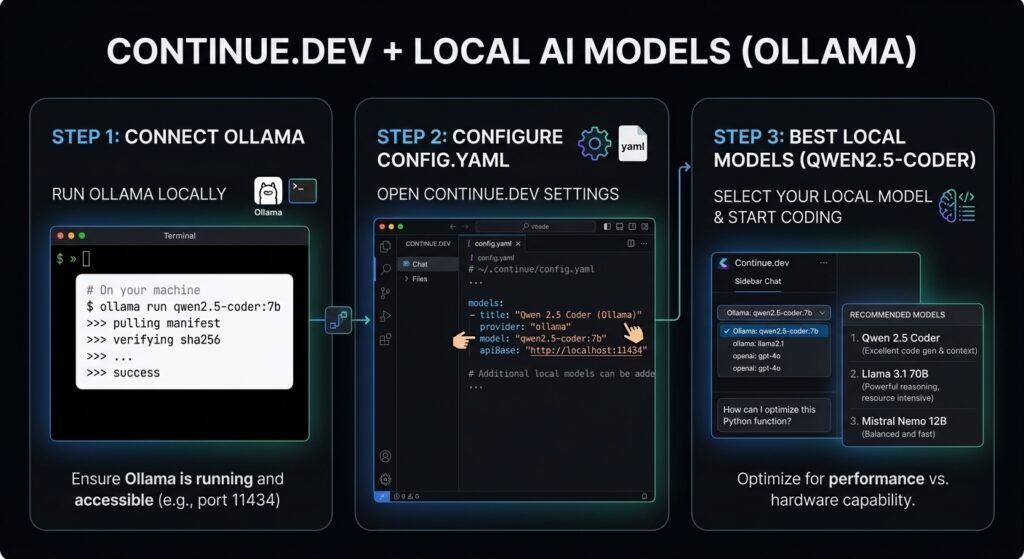
- name: My Local Config
- version: 0.0.1
- schema: v1
- models:
- – name: Qwen Coder
- provider: ollama
- model: qwen2.5-coder:7b
- roles:
- – chat
- – edit
- This example assumes the matching model is installed in Ollama. If you use another model, replace the model ID with the exact name supported by your provider.
3. How to Configure Chat and Autocomplete Models:
Continue allowing you assign multiple models to different tasks. For example, you might use a larger model for conversation and code explanation, and then a smaller, faster model for Tab execution. Add both of these models to the models list and give each role
- name: Coding Setup
- version: 0.0.1
- schema: v1
- models:
- – name: Chat Model
- provider: ollama
- model: llama3.1:8b
- roles:
- – chat
- – edit
- – name: Autocomplete Model
- provider: ollama
- model: qwen2.5-coder:1.5b-base
- roles:
- – autocomplete
I’m still working on it and I’m going to keep working on it. I’m going to keep working on it till it’s finished. Your hardware and model capabilities will determine performance.
4.How to Configure OpenAI-Compatible APIs:
Continue can connect to providers that expose a compatible API. A typical configuration specifies the provider, model name, API endpoint, and authentication details.
- name: Custom API Config
- version: 0.0.1
- schema: v1
- models:
- – name: My Compatible Model
- provider: openai
- model: your-model-name
- apiBase: https://your-provider.example/v1
- apiKey: ${{ secrets.MY_API_KEY }}
- roles:
- – chat – edit
Continue.dev Pros and Cons.
1.Pros
- Freedom as an open-source: Developers are able to see and modify the code because it is under Apache 2.0 license.
- Multiple AI models: Connect to supported providers or utilize local models depending on your settings.
- IDE integration: AI chat, code editing and autocompletion in supported development environments.
- Customizable workflows: Setup models, prompts, rules and tools for various coding activities.
- Local AI support: Leverage solutions such as Ollama to access suitable local models and minimize reliance on hosted APIs.
2.Cons
- Setup can be technical: Setting up model providers, API keys, and local models may take some time.
- AI usage may cost money: Some services charge extra for API usage, although the coding assistant itself is open source.
- Results depend on the model: Code suggestions may contain flaws or overlook project specific requirements.
- Local models need the right hardware: The memory, CPU, and the model you choose all impact performance.
- Maintenance attention required: The original continuedev/continue GitHub repository is tagged as no longer actively maintained. Check the current official documentation and suggested installation settings when picking a version
Continue.dev Alternatives
Continue.dev alternatives If Continue.dev alternative is not suitable or not found, you may consider Continue.dev alternatives. They take a unique approach to AI-assisted coding, including IDE-based code editing to independent coding agents to terminal workflows.
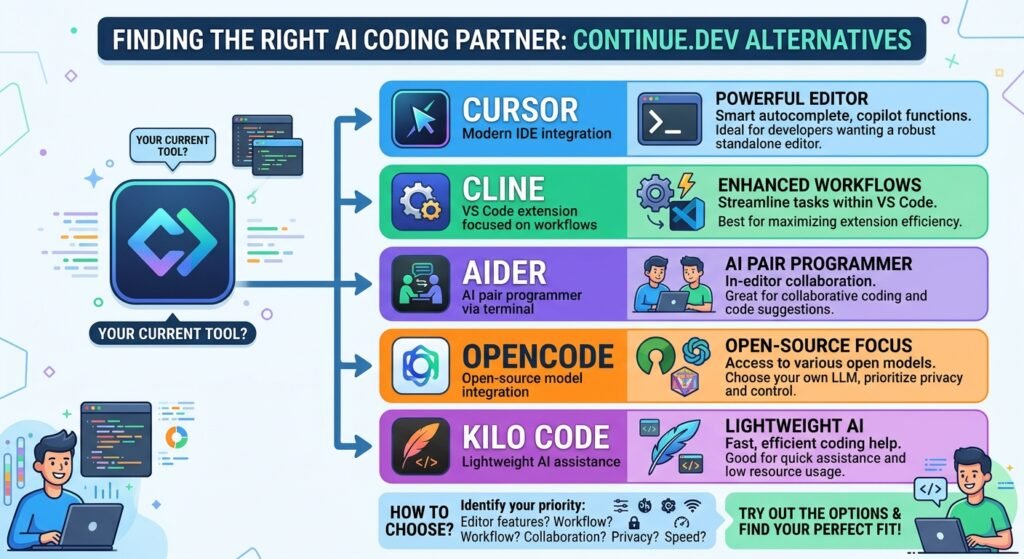
- Cursor: Best overall for an integrated AI coding experience.
- Cline: Best for AI coding agents inside VS Code.
- Aider: Best for terminal-based coding and Git integration.
- OpenCode: Best for developers who prefer terminal-based AI coding.
- Kilo Code: Best for customizable coding agents and multiple AI models.
Overall, a Cursor is a good alternative for those who desire a straightforward AI-powered coding experience. However, if you want open-source tools and more flexibility over AI models, check out Line, Aider, OpenCode or Kilo Code. The right one for you will rely on budget, preferred workflow and model needs.
Continue.dev Common Problems and Fixes
Sometimes Continue.dev does not show autocomplete suggestions, it shows model problems, or it is unable to connect to an AI service. Common difficulties and simple fixes are as follows.
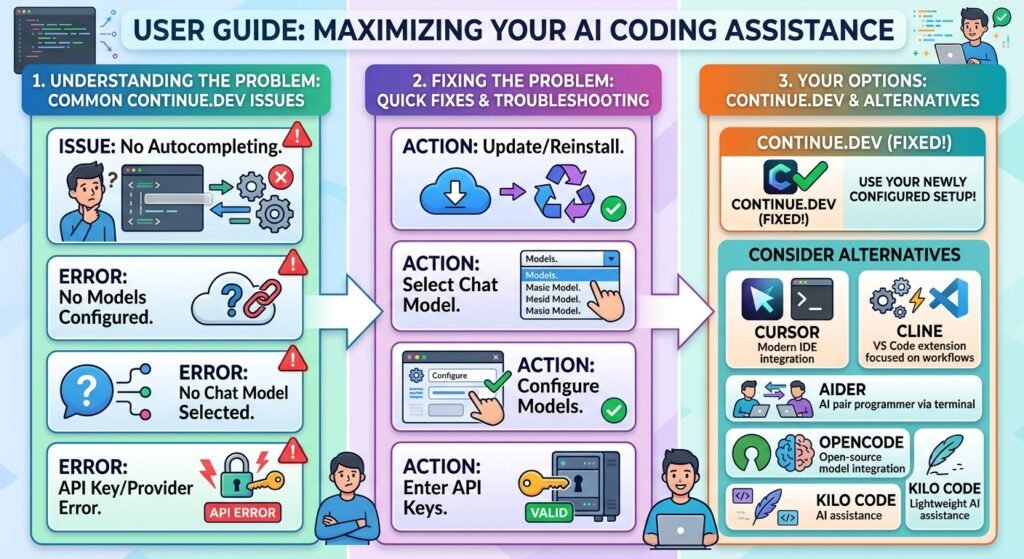
1.Continue.dev Is Not Autocompleting
- If Continue.dev autocomplete not working? Check the settings:
- Turn on Continue’s Tab Autocomplete feature.
- Enable Editor: Inline Suggest Enabled setting in VS Code.
- Make sure that you have a compatible autocomplete model configured.
- Please verify your internet connection or local model state.
- Final check: Open a code file and start typing to see whether suggestions appear.
2.No Models Configured Error
- The error typically means that Continue cannot find a proper model setup.
- What to do about it:
- Open the model settings for Continue.
- Verify model and provider are set up correctly
- When using config.yaml, check that YAML indentation and model details are correct.
- Save configuration and reload Continue
- Final check: You should see your configured model in Continue.
3. No Chat Model Selected Error
- Error: no chat model selected. This can happen if you don’t have a chat-capable model installed or selected.
- How to fix it:
- Open Continue model configuration.
- Select a supported chat model or add a new one.
- If roles are specified, make sure the model has the chat role.
- Reload. Try a basic question. Continue
- Final check: Ask Continue to describe a brief code snippet
4.API Key or Provider Connection Error
- You might be having connection issues caused by an invalid API key, not enough provider credits, an incorrect model ID, or network issues.
- How to fix:
- Check your API key with the provider officially.
- Review your billing requirements and account limitations.
- Kindly verify the supplier name and model id.
- Check Continue’s messages for connection issues.
- Last test: Send a short question and verify the model answers. Do not publish your API key.
5.How to Update or Reinstall the Continue.dev Extension
- If Continue stops working after an update, please try updating or reinstalling the extension.
- Open Extensions in VS Code and search for Continue.
- Install the available update.
- If the problem continues, backup your setup and reinstall the extension.
- Reset your model settings and reload VS Code.
- Final check. Test chat and autocomplete independently. Reinstalling won’t solve wrong model settings or API credentials.
Is Continue.dev Worth Using in 2026?
Yes, Continue.dev.If you want an open-source AI coding tool that provides flexible model choices and customizable processes, then dev is a good option to investigate. It allows AI chat, code editing, autocomplete, and many model providers, including local models.
- Best for: Developers who want model flexibility and a configurable coding assistant.
- Potentially useful for: Developers experimenting with local models and different providers.
- Less suitable for: Users who want a completely hands-off setup without configuring models or providers.
My Final Verdict
If you are a developer looking for some more control over your AI coding setup and regular changes, I recommend Continue.dev. But it takes time to get the model set up and using premium API providers can increase costs. Local models save you API costs but their performance is limited to your hardware and the model you choose.
One big thing to look out for in 2026 is maintenance: the original continuedev/continue GitHub project is marked as no longer regularly maintained. Select a version by referring to the most recent official documentation and suggested installation choices. Overall, Continue.dev is a solid alternative for developers who like to customize their tools, but consumers who favor convenience may prefer a more completely managed AI code editor.
Testing note: This decision is based on listed features and limitations, not on hands-on testing. If you’ve tested Continue yourself.Programmer, add your own experience with autocomplete, code generation, model setup to make the review more trustworthy.