
Codeium AI Review 2026: Features, Pricing, Coding Assistant & How to Use It
Introduction
Codeium AI is an AI coding helper to help developers generate and understand code with less effort. It can automatically complete code as you are typing, write code from a basic prompt, explain code you are working on, and answer coding queries through its AI chat.
I began utilizing Codeium for our own development projects, and my team members now utilize it when they need a fast coding idea or want to learn a piece of code. It’s very useful when you’re working on a feature and don’t want to break your workflow only to find every little code mistake.I have tested its autocomplete, code generation and chat functions during typical programming jobs. In my perspective, Codeium is more of a coding assistant that works with you, rather than something that just creates code for you.But how helpful is Codeium AI for actual dev work? In this review, I’ll be explaining what it can accomplish, how developers are able to use it, and where it can genuinely save time in everyday development.
What Is Codeium AI?

Codeium AI is an AI developer assistant that makes everyday programming much easier. If you’re asking yourself what is Codeium AI, think of it as a coding tool that can help you create code, analyze existing code, and solve development difficulties without having to always get yourself out of your workflowOne of the biggest benefits of Codeium AI is that it may help you while you are in the process of developing a project. It may suggest code as you type, help you produce code from instructions, explain unfamiliar code, and suggest solutions when you get stuck. This is beneficial for both ordinary development work and more challenging coding difficulties.
I utilize the Codeium AI tool in my personal development work, as does my team. For example, when we need a quick beginning point or when we want to understand a piece of code or when we need help with a job that would take more time to explore. It doesn’t replace our development process, but it can speed up a number of portions of it.The assistant is particularly useful because it works close to where developers already write code.” The Codeium AI code assistant was created to be part of the workflow of developers and be there for assistance when required, rather than a separate website.
The tool has Codeium generative AI under the cover, which allows it to produce and work on code based on your instructions and coding context. That’s why the Codeium AI coding tool can be helpful for more than just basic autocomplete. It may help developers through many phases of coding from writing down a first concept to understanding and refining existing code.
Is Codeium AI Free?
Yes, Codeium AI is free to use, so developers are able to start using its AI coding features without subscribing for a membership. If you want to try the tool before you buy it and get a feel for how easily it will integrate into your regular development workflow, the free option is handy.
1.Is Codeium AI Free to Use?
Yes. Codeium offers a free option for developers who want to utilize AI help without immediately committing to a subscription plan. This makes it easy for individual developers, students and small teams to experiment with AI-driven code before they have to get more advanced access.

2.What Do Free Users Get?
The free Codeium AI coding assistant gives you access to basic coding support, including AI-powered code finishing and other tools to help you with everyday programming. I use the free version for part of my personal coding work and my team does too when we need fast suggestions or support when working on a project.
The free AI code completion might be helpful for simple development tasks such as finalizing lines of code and minimizing repetitive typing. It saves your time, and you do not have to pay at first.
3.What Are the Limitations?
The free plan is not optimized for unlimited or heavy AI use. The free option might feel limiting over time for developers who are using AI on a daily basis, as it comes with less resources and use limits compared to the subscription version.
“The exact limitations can also change over time as the service updates its plans and features. So it’s important to check the current plan specifics before you select Codeium for a larger development workflow.
4.Do You Need a Paid Plan?
No, you are not required to have a premium plan. In case you are primarily looking for basic coding help, autocomplete, and a way to test AI development features, the free Codeium AI tool may be enough.
The subscription plans are better if you want more use, complex features, or are very dependent on AI in your regular development work. It makes sense to start out with the free option for my own use and my team’s basic coding tasks before considering if an upgrade is truly essential
Codeium AI Features
1.AI Code Autocomplete
One of the most useful features is Codeium AI autocomplete, which gives you code suggestions as you type. Instead of writing every line by yourself, you might accept a suggestion if it is what you want to construct. This can be useful for repeating code, regular tasks, and closing long sentences.Codeium AI autocomplete works directly into the coding workflow so that you may obtain ideas without having to constantly switch to another tool. It’s also a code generation tool, so developers are able to create code faster and still be in control of what is added to the project.
I use Codeium AI autocomplete in my personal programming work, my team utilizes it too. In everyday coding, it can save time on small tasks and help reduce the amount of repeated typing. Developers who want to check out AI help without paying are also able to use Codeium’s free AI code completion tool within the free access that is offered.

2.AI Code Generation
Codeium is able to create code from simple instructions. You may describe what you want to create and let the AI provide a starting point for you to explore and adjust.If you have any questions about how to use Codeium to produce code, the fundamental approach is simple: define the task clearly, analyze the generated result, and adapt it to meet your project. In place of coding everything from scratch, you may use Codeium to create code for functions, sections, or other development tasks.
Codeium AI code generator might be helpful when you know what you would like to create but need help writing the first version. What can Codeium AI build for you? It can be helpful for creating different kinds of code depending on your project and what you tell it to do. This is a tool I use when I need a quick starting point and my team uses it when a task might benefit from creating a first draft of code.
3.AI Chat
Developers are able to link with AI through standard questions and asks with Codeium AI chat. Ask me about a coding problem, ask for an explanation, or receive help with something you’re working on.The feature is more helpful when you mix Codeium AI autocomplete and chat than autocomplete alone. Autocomplete helps you while you type, and chat is best for asking a particular question or discussing a code problem.
I find the chat function helpful when I am stuck on something and would like to fully understand the situation before making changes. My team also utilizes it if we want a brief explanation or an alternative to a coding assignment.
4.Code Explanation and Refactoring
Codeium can also help you understand existing code, which is beneficial for working on a new project or an older codebase. It may be used to describe what a piece of code does, and to break it into parts that may be difficult to figure out.
It may also assist in redesigning and improving current code. You may ask it to break down a part, or propose a new technique, or help you rework code while maintaining the original intent. I use it while I’m analyzing code on my own projects, and my team may utilize it as an extra hand during development and code review. What is important is that you use the suggestions as a starting point and not the final word. Testing and reviewing created or changed code is still essential, especially for production applications.
Codeium AI for VS Code
For Visual Studio Code developers, Codeium is accessible within the editor so you do not have to go to a different website every time you need coding help. Codeium AI for VS Code is a plugin that delivers AI-powered coding help into your everyday development process.

1.How to Install Codeium AI in VS Code
It’s easy to set up the Codeium AI plugin for VS Code. You may install the Codeium AI extension from the Visual Studio Code Extensions marketplace and start using its programming capabilities within the editor.
Follow these steps:
- Open Visual Studio Code on your computer.
- Click the Extensions icon in the left sidebar.
- Search for the official Codeium AI plugin or Codeium extension.
- Select the Codeium extension and click Install.
- After installation, follow the sign-in or account setup instructions shown by the extension.
- Open a coding project or create a new file to start using the assistant.
2.How to Use Codeium AI in VS Code
After installing the extension, open any suitable code file and start typing. The Codeium AI VS Code extension may give you with ideas as you type which you can approve if they fit what you want to add.You can also use AI’s features to ask questions, produce code, or ask for help understanding a code that already exists. For example, you may describe what you want to develop and the worker will generate a starting point that you may look at and change.
I use Codeium AI VSCode in my personal development flow, and so does my team. We typically use it when we need rapid code recommendations, require help with a coding task or want to learn part of current code without leaving VS Code.
3.Is Codeium AI Extension Useful for VS Code?
If you are a developer who uses all of your time in Visual Studio Code, it’s helpful that the Codeium AI plugin is already there of the editor, so you can get the coding help as you work. Keep working on your project with autocompletion, code generation, explanations, and chat-based support when you need it.
The biggest advantage is its ease: You do not have to transfer code over to a separate AI tool and then back into your project; you get help within the same working environment.
Codeium AI for Other IDEs
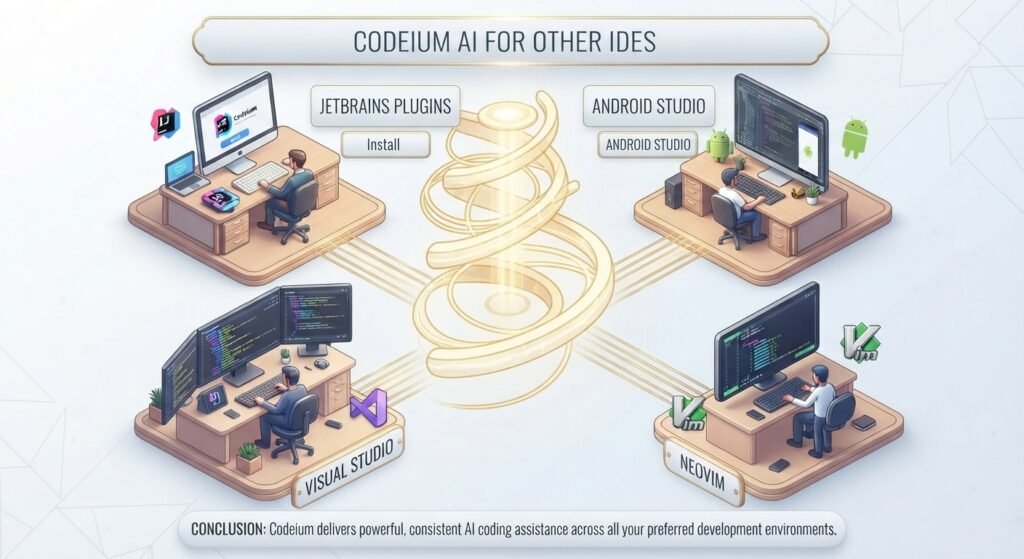
Codeium is compatible with a wide range of developer environments. And its AI coding aid is available to those who prefer other IDEs and editors when enabled. This helps preserve a comparable AI-assisted workflow while switching between projects or programming environments.
1.Codeium AI for JetBrains Plugins
If you are using a JetBrains IDE, you may add AI coding help to your development environment with the Codeium AI JetBrains connection. This may be handy for developers working in multiple languages and projects inside JetBrains tools. For Python devs, Codeium AI PyCharm may aid with code recommendations and other AI-assisted development activities. In addition, IntelliJ users may check out the Codium AI IntelliJ plugin or the Codium AI plugin IntelliJ integration to bring AI help to their workflow.
I utilize JetBrains-based tools for specific development activities. My team works across several IDE’s depending on the project. The presence of AI help inside the IDE we presently use might make it easier to transition between projects.
2.Codeium AI for Android Studio
Android developers can also search for Codeium AI Android Studio support to include AI coding help in their Android development process. Codeium AI Android Studio is useful for developing or completing code, understanding existing code or obtaining help with development tasks.
For Android developers who do most of their work developing Android applications, AI support built into the development environment can reduce the need to move back and forth between the IDE and a stand-alone coding tool.
3.Codeium AI for Visual Studio
Developers on Microsoft’s Visual Studio may now check out Codeium AI Visual Studio support. The goal is the same: deliver AI-powered coding help in the same space where developers work and manage their projects.
Codeium AI solution for Visual Studio might be helpful for developers who are looking for some help with coding tasks without changing their current process. I like to have AI help near to the project I’m working on, and my team likes to do the same when selecting development tools.
4.Codeium AI for Neovim
If you are a developer who likes lightweight editors, then Codeium AI Neovim support can enable AI coding help in a Neovim-based workflow. You may also get searches like Codeium AI nvim, Codium AI Neovim and AI Codeium Neovim if you search for methods to use Codeium with the editor.
This approach might be extremely helpful for developers who choose to use keyboard-driven workflows and want AI help without jumping into an IDE with full features. If you’re already using Neovim in your development setup, you can add AI coding support to aid with code completion and other daily programming duties without affecting your usual workflow.
How to Install Codeium AI

1.Codeium AI – Installation Guide
Depending on where you want to utilize Codeium AI, the installation process is different. Codeium is now available as Windsurf, please utilize the official Windsurf source, instead of the third party distribution websites.
- Method 1: Installing Codeium AI in VS Code
- Start up VS Code.
- Click on the Extensions icon on the left side.
- Look for the Windsurf Plugin.
- Choose the official extension and click on Install.
- If asked, log in or sign up.
- Open your project and begin utilizing the AI coding features.
2.How to Install Codeium AI on Windows – Method 2
If you want to get Codeium AI for Windows, use the official Windsurf download page and not some rogue Codeium AI free download website.
- Step 1: Visit the official Windsurf webpage.
- Download section go.
- Select the Windows edition.
- Download the installation.
- Execute the downloaded setup file.
- Follow the install instructions
- Open the app and sign in.
This is the official way to get Codeium AI tool downloaded for those who prefer the standalone desktop experience.
3.Adding Codeium AI to other IDEs – Method 3
Install the official Windsurf plugin for JetBrains, Visual Studio and Neovim from the corresponding IDE or follow the official plugin instructions.
- Usually the steps are:
- Open up your IDE.
- See its Plugins or Extensions section.
- Look for Windsurf.
- Official plugin installation
- If necessary, restart the IDE.
- Sign in and get started with AI coding features.
To protect yourself, do not download Codeium installations or plugins from unfamiliar websites. The easiest and safest way to install Codeium AI is via the official website.
How to Use Codeium AI
The basics are easy if you want to find Codeium AI how to use instructions. Once you install the extension and log in, Codeium may be used in your coding environment to produce code, enhance current code, and ask questions about issues you are facing.

1. Add the Extension
First, install the official Codeium/Windsurf plugin for your IDE. For VS Code, install from the Extensions area and then launch your coding project.
2. Log In
Log in to your account when requested after installation. You should have access to the AI capabilities in your development environment after you sign in.
3.Open Your Project
Open the project you wish to work on and create a new file or open an existing file. Then, Codeium can offer ideas depending on what you’re writing and the coding context.
4. Leave a prompt or comment
A good first step is to write out what you want in a code comment or prompt. For example, you may say:
// Create a method to check if an email address is legitimate
That offers the AI a clear command on what you want to construct .
5.Code generation
If you question how to utilize Codeium to produce code, simply provide a clear instruction and the assistant will propose a solution. You may then inspect the resulting code before accepting it.
6.Approve or Edit Suggestion
Make sure Codeium’s recommendation is what you want. It’s something you can accept, or you can tweak certain elements of it, or you can write it yourself. This is a key element of Codeium use since AI produced code needs still be inspected and tested.
7.Utilize AI Chat to debug.
I utilize this strategy in my own development projects and so does my team. In general, we see code produced by AI as a starting point, not something we just drop into a project.
Codeium AI Pricing
If you are looking for Codeium AI price, be informed that Codeium is now available under the Windsurf brand. Today the software has free and premium choices and you should choose the correct Codeium AI plan based on the amount of AI help you require.

1.Free Plan
For developers who want to check out an AI coding tool without the commitment of a monthly membership, the free option is a nice place to start. It can be good for basic code support, autocomplete, and sometimes AI-supported development.
2.Paid Plans
Paid subscriptions are for developers who want more AI usage and more features. If you’re using the coding helper often throughout your workday, a subscription package can be valuable to get more than just free access.
3.Which Codeium AI Plan Should You Choose?
The free plan is a good starting point, especially for occasional coding help. If you’re a developer and use AI for code generation, fixing bugs, and regular tasks, you might want to look into a subscription plan.
I use AI code help in my personal growth work, and so does my team. For us, the best option depends on how much AI help a specific project needs, not on choosing the most expensive alternative.
4.What does Codeium AI provide?
Codeium AI’s basic offerings are designed to help developers write and read code better. This can include code completion, AI discussion, code creation, and other developer-focused support depending on the plan and current availability.
Codeium AI vs GitHub Copilot
When comparing Codeium AI vs Copilot, both are useful AI coding helpers, but they are geared at different workflows. Codeium/Windsurf is an excellent alternative for developers looking for AI help in several coding environments, whereas GitHub Copilot is a solid option for those already working closely with GitHub.
| Feature | Codeium AI / Windsurf | GitHub Copilot |
| Free plan | Free option available | Free plan available |
| Autocomplete | AI code completion and suggestions | Code completion and suggestions |
| Chat | AI chat for coding help and debugging | Copilot Chat |
| IDE support | VS Code, JetBrains, Visual Studio, Neovim, and more | VS Code, Visual Studio, JetBrains, and more |
| Code generation | Generates code from natural-language prompts | Generates and modifies code from prompts |
| Ease of use | Easy to add to an existing coding workflow | Easy, especially for GitHub users |
| Pricing | Free and paid plans | Free and paid plans |
| Best for | Developers wanting flexible AI coding assistance | Developers who want strong GitHub integration |
1.Which One Should You Choose?
Both tools are useful for basic auto-complete, code creation and AI conversation. Your choice is mostly based on your development methodology and the environment you are already in.
I work in AI coding help on my own projects, and my team does as well. If you’re looking for AI aid that works across several development environments, give Codeium/Windsurf a look. If you’re already a heavy GitHub user, then GitHub Copilot could be the more logical choice.
Codeium AI vs Windsurf
If you are trying to compare Codeium AI against Windsurf, they are quite close and are not totally independent programs. Windsurf is the newer brand and a more comprehensive AI development platform, whereas Codeium was the initial AI code aid.
1.What’s the Difference?
Codeium AI was best recognized for capabilities like AI autocomplete, code creation and coding chat within current IDEs. Windsurf takes this to the next level with an even more sophisticated AI IDE that understands your project and can help you with major development chores.
In short, the Windsurf product experience became Codeium. So when you see Codeium AI Windsurf or prior Codeium references, you are typically seeing the former branding or plugin ecosystem attached to Windsurf.
If you’re looking for a comprehensive AI coding environment, Windsurf is the most appropriate solution to consider now.
Is Codeium AI Good for Coding?
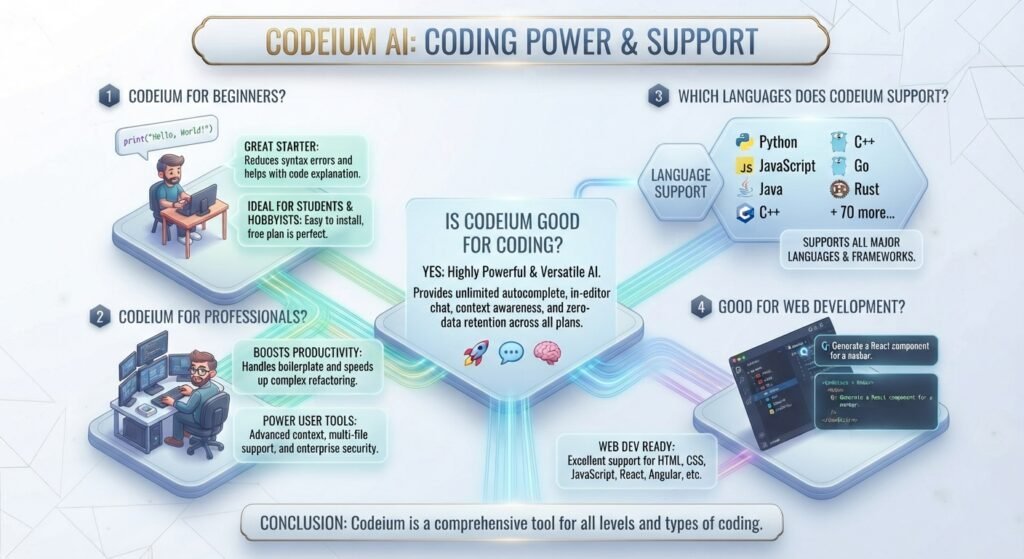
Yes, Codeium may be a helpful AI-assisted coding tool, especially if you want help developing, comprehending or troubleshooting code. It can save you time on repeated chores while still allowing you to evaluate and manage the final code.
1.Is Codeium Good for Beginners?
Beginners may use codeium AI for coding to explain code, provide solutions and offer examples. When you get stuck on a programming problem, it might also make learning easier.
2.Is Codeium Good for Professional Developers?
Codeium helps professional developers write code quicker, fix bugs, redesign, and do repetitive coding jobs. I find it most useful for getting a quick start or catching up on normal development work.
3.Which Languages Does Codeium Support?
Codeium works with common programming languages including JavaScript, Python and Java. Developers who want Codeium AI’s coding assistance in supported development environments can utilize Codeium AI JavaScript or Codeium AI for Java.
4.Is Codeium Good for Web Development?
Yes. It can be helpful for web design activities such as writing JavaScript, creating functions, resolving problems, and producing repetitious code. It can also assist developers in understanding current code and finding possible fixes while debugging.
Overall, Codeium is a solid alternative for AI-assisted coding if you want to decrease repetition and receive some aid in coding without losing control of your project.
Codeium AI for Developers?
Codeium AI is a useful AI code helper for developers that can help with autocomplete, debugging, documentation, test development, refactoring, and code review. It may decrease tedious coding tasks, explain unfamiliar code, provide remedies for bugs, and assist engineers in writing tests or enhancing existing code. For bigger projects, it can also enable pull request and developer processes with AI-assisted feedback. I use Codeium in my personal development job when I need a fast code tip or wish to accelerate a routine process. The biggest benefit is not that it will replace the developer, but that it will assist the developer in writing, comprehending, testing, and enhancing code more effectively.
Codeium AI API and Documentation?
If you are looking for the Codeium AI API, Codium AI documentation, or Codeium AI online, then you need to know the current product direction. Codeium is currently affiliated with the Windsurf brand and the existing documentation mostly covers Windsurf, its AI coding tools, IDE connectors and developer processes.
For developers searching for an AI coding experience, the current option to access Codeium AI online is through Windsurf. But generally, I wouldn’t say Codeium is a public API, unless the precise API you’re interested in is formally published. This distinction is significant when deciding on Codeium for development or integration tasks.
Is Codeium AI Safe to Use?
Yes, Codeium AI is typically safe to use for coding, but developers should still exercise caution when dealing with private and sensitive data. Codeium is now part of the Windsurf ecosystem and its regulations at the moment say client data is not utilized to train AI models without prior written agreement.
1.Privacy and the Source Code
AI coding characteristics may process code and project context. For this reason, never paste passwords, API keys, secret credentials or extremely sensitive source code unless your security policy permits it.Enterprise users should consider available security measures, permissions, data management and compliance requirements before utilizing the product across private business initiatives.
Verdict: Codeium/Windsurf is a solid choice for AI-assisted coding, but use responsibly and don’t provide critical information.
What Are the Limitations of Codeium AI?
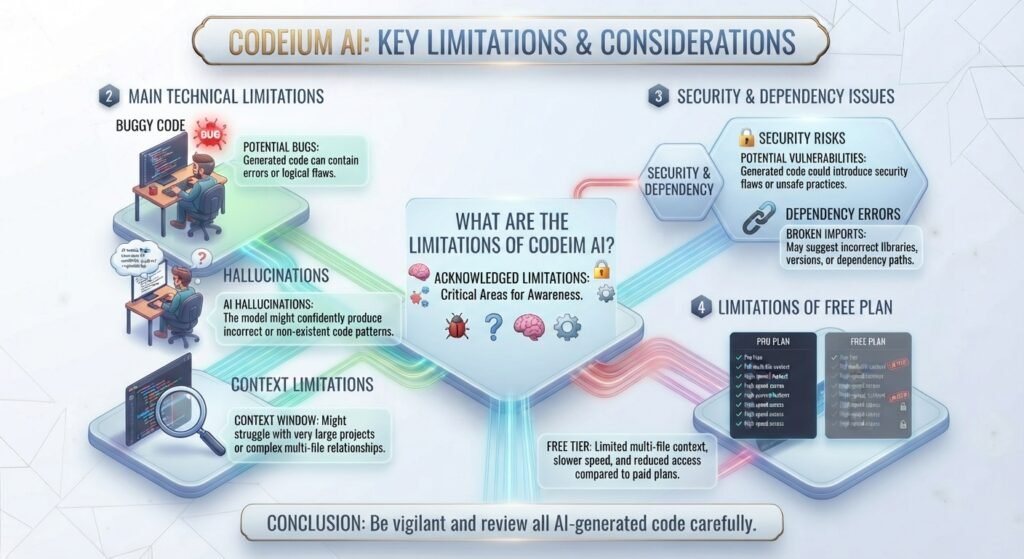
Codeium artificial intelligence can accelerate coding, but it’s not ideal. Like other AI coding tools, it can sometimes generate inaccurate code, misinterpret your instructions, or come up with answers that seem right but are actually wrong.
1.Main Limitations
1.Buggy code
AI ideas may contain bugs or logic flaws.
2.Hallucinations:
It may occasionally make up functions, APIs, or solutions that don’t actually exist.
3.Context limitations
Complex projects might be tougher to grasp when the context required is extensive or distributed over several files.
4.Security issues:
Developers should not share passwords, API keys, credentials or very sensitive code.
5.Dependency errors
It might indicate old or incompatible packages, libraries, or versions.Human review required: Always inspect, test, and review generated code before using it in production.
6.Limitations of free plan
Availability of free access depends on the current offering and may have use limitations and fewer features than premium subscriptions.
In my view the best use of Codeium is as a coding assistant, not a replacement for a developer. It can save time, but ultimately the developer is responsible for code quality, security and testing.
Codeium AI Review: My Experience
I used Codeium AI during typical development work to assess how well it works outside of simple code suggestions. I messed around with basic code creation, auto-complete, debugging, code explanation, and VS Code integration. I tried more complicated questions and used it with other programming languages.
Codeium was fast and typically offered meaningful solutions for simple coding jobs. The autocomplete was decent for repetitive code, and the AI conversation was great when I wanted to grasp an issue or explain existing code. Additional complicated prompts needed additional assessment, especially if the assignment involved many files, dependencies or particular project needs.
Overall: I found Codeium useful for everyday development, especially autocomplete, repetitive coding, and quick debugging help. It is not perfect, but with proper human review, it can save developers a good amount of time.
Who Should Use Codeium AI?
Codeium AI can be useful for anyone who wants faster and easier coding assistance. It is especially suitable for:
- Beginners: Get code suggestions, explanations, and help when learning programming.
- Students: Practice coding and understand difficult concepts more easily.
- Freelance Developers: Speed up repetitive tasks and complete client projects more efficiently.
- Web Developers: Get help with HTML, CSS, JavaScript, and other web development tasks.
- Software Engineers: Use AI for code generation, debugging, refactoring, and documentation.
- Development Teams: Improve everyday workflows and reduce time spent on routine coding tasks.
Overall, Codeium is a good choice for developers who want an AI assistant to support their workflow without completely replacing their own coding skills.
Codeium AI Alternatives?
If Codeium AI isn’t the appropriate match in your workflow, there are a number of good alternatives. The ideal solution depends on if you want an AI-first IDE, GitHub integration, support for AWS development or a terminal-based coding agent.
| Tool | Best For | Main Strength |
| GitHub Copilot | General development | GitHub and IDE integration |
| Cursor | AI-first coding | Advanced code editing and agent workflows |
| Windsurf | AI-assisted development | AI IDE and agent-style coding |
| Amazon Q Developer | AWS developers | AWS-focused coding assistance |
| Claude Code | Advanced developers | Complex coding and terminal workflows |
1.Which Codeium Alternative Is Best?
For day-to-day coding, GitHub Copilot and Cursor are good options. Codeium is tightly coupled with Windsurf and symbolizes its larger AI IDE goal. Amazon Q Developer is a better option for developers who do a lot of work with AWS, whereas Claude Code is good for sophisticated multi-step programming jobs.
If you already appreciate Codeium’s workflow, the next most obvious thing to look into is Windsurf.
Frequently Asked Questions